
Compare the original seller listing and exact options, then verify each agent’s current conditions and the complete parcel cost.
Start with the listing, then choose the agent
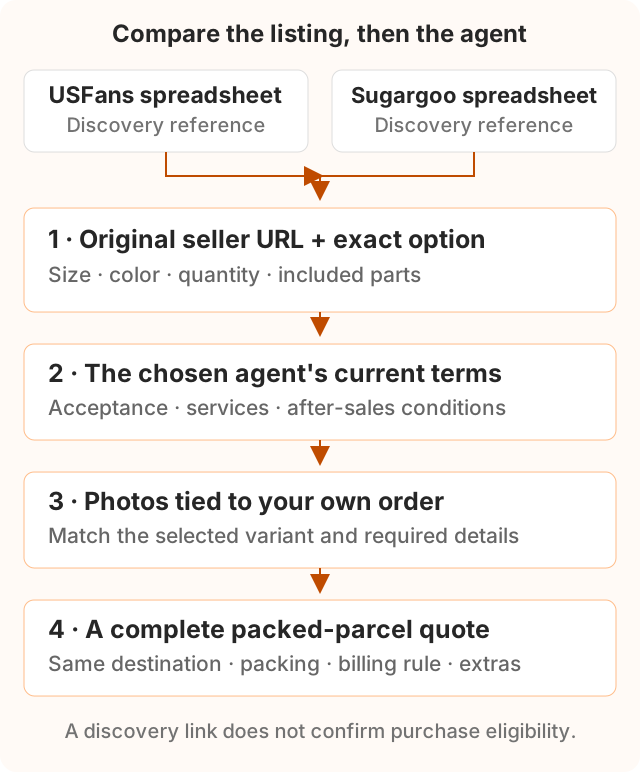
A USFans spreadsheet can help you discover a seller listing. Before comparing it with a Sugargoo find, separate three things: the spreadsheet that organised the link, the seller offering the item, and the agent through which you would place the order. A spreadsheet name alone does not establish current stock, the selected price or an accepted shipping route.
The USFans help centre lists guidance for shopping-agent orders, inspection, detailed photos and actual versus volumetric weight. Sugargoo’s listing guide explains reviewing seller options and paying for the item and domestic delivery before the later international-shipping stage. Use each platform’s current information for the actual order rather than transferring one platform’s conditions to the other.
Recover the original seller link
Open the link you saved and identify where it leads. An agent product page, an original marketplace listing and an affiliate redirect are different URLs. If a page provides a product-source or original-listing link, record that seller URL alongside the marketplace and item identifier.
Keep the exact size, color, quantity and included parts as a separate note. Try the seller link in the agent you are considering, then inspect the imported details. If import fails, ask that agent whether it can purchase the item; do not assume another platform’s page is a supported product URL.
Useful record: seller URL; item identifier; selected option text; quantity; date checked; answer to any unresolved question. Keep an existing paid order’s number separately—the link is a reference for a new purchase decision, not a way to move a warehouse item.
Build a like-for-like comparison
Use one selected item and destination to fill the table below from current checkout information or a written quote. Leave an unavailable value marked as unconfirmed. This is a blank comparison worksheet, not measured prices or a ranking of the two services.
| Check | Record for USFans | Record for Sugargoo |
|---|---|---|
| Seller and variant | Original URL, option and quantity | Confirm the same URL, option and quantity |
| Item and domestic charges | Selected price and domestic delivery | Selected price and domestic delivery |
| Payment total | Currency, conversion and payment charges | Currency, conversion and payment charges |
| Inspection required | Included scope and price of extra views | Included scope and price of extra views |
| After-sales conditions | Eligibility, request deadline and deductions | Eligibility, request deadline and deductions |
| Parcel plan | Accepted goods, destination, packed weight and dimensions | Use the same goods and packing requirements |
| Freight and extras | Billing rule, quoted total and excluded charges | Billing rule, quoted total and excluded charges |
Do not compare one platform’s item-only price with the other’s delivered parcel total. If the box or packing changes between quotes, record the difference. A lower price that excludes a needed service is not a complete comparison. The USD budget guide explains how to keep these cost categories separate; its invented numbers are teaching examples, not USFans or Sugargoo quotations.
Keep QC evidence tied to your own order
A spreadsheet’s saved pictures can help you decide which views to request. They do not show that your chosen variant has arrived or that your order has passed inspection. Match the order number, selected options and photos associated with the item you actually purchased.
Ask the chosen agent which checks and extra measurements are available. Describe the detail that would change your decision: a shoe-size label, a garment width or a bag opening, for example. Read that agent’s inspection scope rather than assuming that an appearance photo proves authenticity or internal function. Our QC guide explains the Sugargoo workflow; confirm USFans conditions through its own help centre and account.
Decide before payment or dispatch
If you are still choosing an agent, resolve whether it can buy the exact item and ship it under your destination’s applicable route rules. Save the current conditions and quote date with the comparison.
If you already paid, check the existing order’s cancellation or return conditions first. If goods are already stored, ask the current agent whether forwarding or another arrangement is available and what it involves. Do not treat copying a seller link into another site as an approved transfer of the existing goods or payment.
For browsing on this site, choose sneakers, hoodies or another product category, then use its specific measurement checks. These shortlists are organised for Sugargoo shoppers. Whether you continue with USFans or Sugargoo, the useful decision is the same: a matched listing, understood service conditions and a complete quote for your own parcel.
Official sources & review notes
This original checklist cites the two platforms’ published references, reviewed on 9 October 2026. It does not report test purchases or live comparative quotes. Confirm current services, fees, after-sales conditions and route eligibility in the account of the agent you choose.
- USFans: official help centre and service topics
- Sugargoo: reading seller listings
- Sugargoo: inspection scope and photo services